-start up the application, select Dictionaries top menu by clicking it or pressing Alt+i, then select
dictionary type by clicking it or pressing shortcut key: Alt+s for Job Status or Alt+t for Payment
Type, eventually:
--press the Add button or Alt+a or
--search for an entry, select one and press Modify button or Alt+m;
To add new entry to a dictionary, navigate to Dictionary
List window and click Add button or press
Alt+a key combination. To modify entry, navigate to application Dictionary List
window, search for
an entry, select it in a list and eventually click Modify button or press Alt+m key combination.
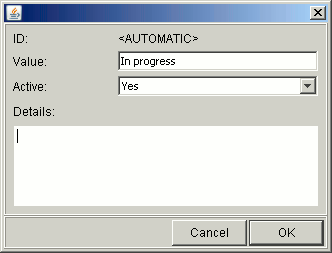
In both cases you will be brought to Add new/edit entry window:
Dictionary entries have the following properties:
-Value - text visible in controls that make use of the dictionary;
-Active - flag whether this dictionary entry went out of use;
-Details - additional information, length not limited;