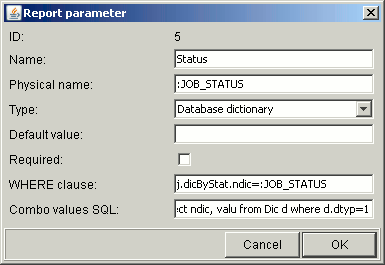
How to get here:
-start up the application, select in top menu Reports->Manage or press Alt+M and then M
keys.
Select report in left hand side list. Then:
--click "Add Param." or press Alt+A keys or
--select existing parameter in right hand side grid and click "Modify Par." button or press Alt+M
keys.
The window presents details of a report parameter, mostly defined in HQL language. Please note,
that familiarizing with Managing Reports Overview is recommended before editing a report
parameter. Also please pay attention to naming of HQL objects - HQL query built for a report is a
merge of HQL data from report definition and from parameters - so if report definition in '"From"
part: FROM...' defines table "Job j", you must refer to this table in report parameter as "j".
Report parameter has the following properties:
-Name - Name of parameter visible on "Report Run" form;
-Physical name - Name of placeholder within HQL definition of the parameter that will be replaced
with filter data entered by user; The naming convention for this placeholder is as follows: it should
start with ":" and it schould be written in capital letters with words separated by "_";
-Type - The type of parameter. Usually, but not always, determined by the type of table column
the report parameter restricts;
-Default value - Value of parameter set by default when report is opened;
-Required - If checked, report cannot be run without this parameter set.
-WHERE clause - HQL restriction, usually in format: table alias.HQL property = physical name;
-Combo values HQL - Valid only if type = "Database dictionary"; contains complete HQL query
where the first column contains integer identificator, and the second one contains text meaninful
for the user.
EXAMPLE
Name
Status
Physical name
:JOB_STATUS
Type
Database Dictionary
Default value
[empty]
Required
[not checked]
WHERE clause:
j.dicByStat.ndic=:JOB_STATUS
Combo values HQL
select ndic, valu from Dic d where d.dtyp=1