-start up the application, click the Add button or press Alt+a key or
-start up the application, select a customer and click the Modify button or press Alt+m key;
To add new customer, navigate to application main window and click Add button or press Alt+a
key combination. To modify existing customer, navigate to application main window,
search for a
customer, select it in a list and eventually click Modify button or press Alt+m key combination.
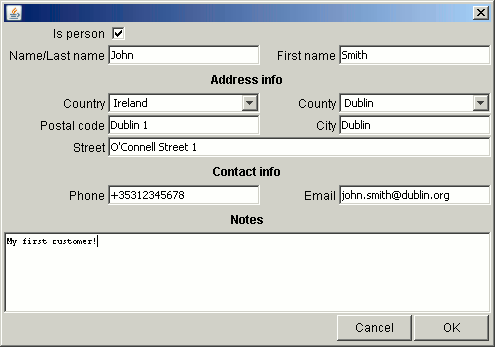
In both cases you will be brought to Add new/edit customer window:
Customers have the following properties:
-Is person - flag whether customer is a person (ticked) or a company/institution (unticked);
-Name/Last name - person last name or company name;
-First name - person first name;
-Country - country, you can select existing one or enter another manually;
-County - county or district, you can select existing one or enter another manually;
-Postal code;
-Street - street and house/flat number;
-Phone - telephone number;
-Email;
-Notes - additional information, length not limited;