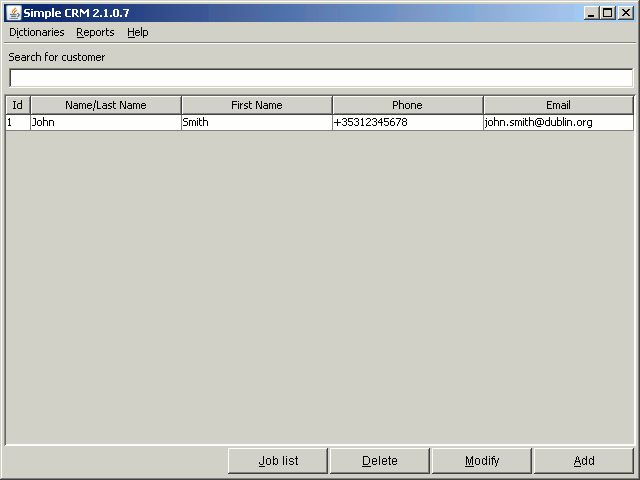
How to get here: start up the application;
Application's main window presents list of customers:
To search for a customer, enter search phrase in "Search for customer" edit box. System
searches for all customers with search phrase within last name (or company name), or telephone
number or email address. Searching is automatic, just wait half a second after typing last
character.
You can add new customer by clicking the Add button, or by pressing the Alt+a combination - you
will be brought to Add new/edit customer
window.
To modify existing customer, select them in list and click the Modify button, or press the Alt+M
combination - again, you will be brought to Add new/edit customer
window.
To delete a customer, select them in list and click the Delete button, or press the Alt+D
combination. System will ask for confirmation - if you confirm, the customer will be permanently
deleted.
NOTE
You cannot delete customers that have assigned jobs - you must delete jobs first on the Job
list
screen.
Each customer has a collection of jobs (or, in other words - orders). To view list
of jobs for
customer, select the customer in list and then click the Job List button, or press the Alt+J
combination - you will be brought to the Job list window.